MatricX Bake · Version 1.6.2 · Blender Add-on
One bake.
Game-ready textures.
Bake clean PBR maps from any material — including MatricX Pro's procedural imperfections — into one shared texture set, packed and ready for FBX or GLB export.
01 / The Problem
Baking shouldn't mean
rebuilding your scene by hand.
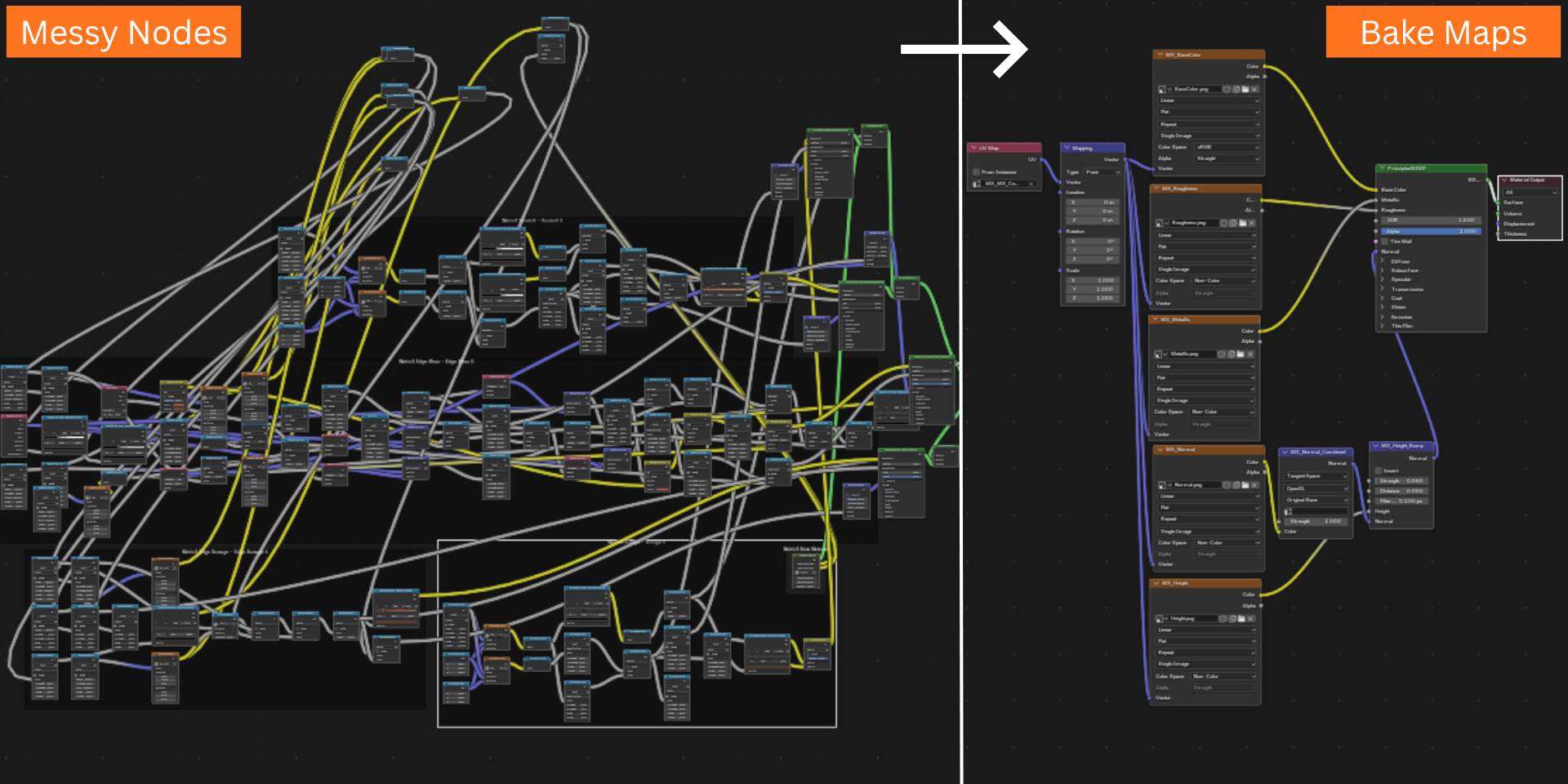
Getting from a finished Blender material to clean, game-ready texture maps is usually its own project.
Overlapping UVs. Procedural masks that stretch or scramble the moment you join meshes. Manually packing AO, roughness and metallic into one channel. Decals that don't line up with the baked material. MatricX Bake is built to remove that entire second project.
02 / The Workflow
Prepare. Bake. Export.
Select the object or collection to bake · repair or build a shared bake UV if needed · choose which maps to bake · check readiness and bake · apply the result with Setup Baked Material.
03 / Prepare Mesh & UVs
Good UVs, without
the manual repair work.
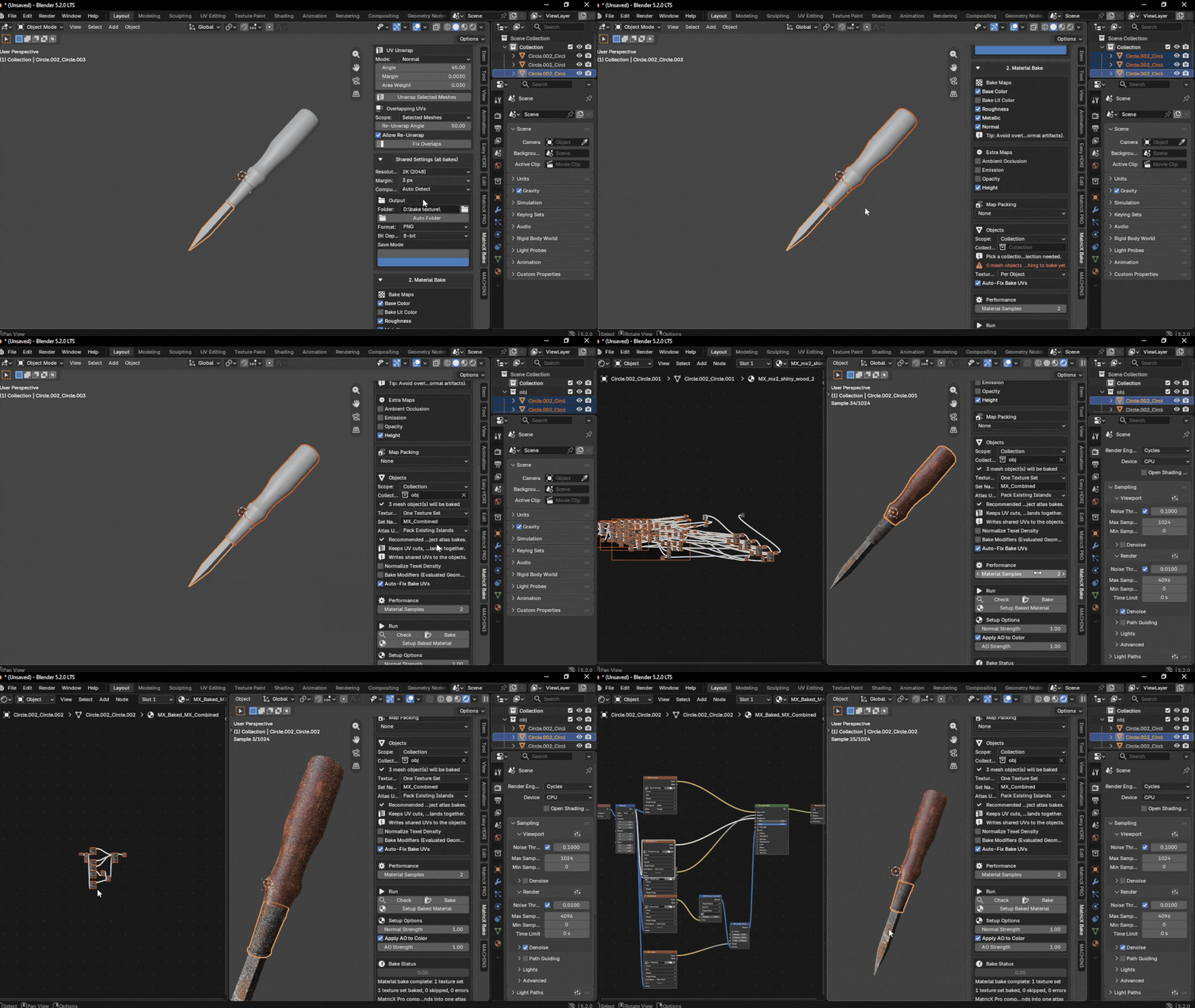
A procedural material can look correct in the viewport without usable UVs. MatricX Bake audits the actual bake layout before it ever starts.
Normal Mode
Best for simple and medium meshes. Uses Blender's own unwrap and packing tools — fast and reliable for common props.
Advanced Mode
Best for dense, subdivided, or overlap-prone meshes. Uses MinistryOfFlat when configured (Windows only).
With Auto-Fix Bake UVs enabled, MatricX Bake detects missing UVs, zero-area faces, stacked or overlapping faces, and coordinates outside the 0–1 tile. When the active layout is unsafe, it creates a dedicated MX_BakeUV and leaves your original UV layer untouched.
04 / Material Bake
Clean PBR maps from
any material, any complexity.
Bake maps from simple and complex node materials — procedural gradients, ColorRamp chains, and layered Mix Shader setups all resolve correctly.
| Map | Captures | Color Space |
|---|---|---|
| Base Color | Procedural gradients, ColorRamp nodes, MatricX layers, complex shader chains | sRGB |
| Roughness | Principled, glass/refraction, or resolved shader nodes | Non-Color |
| Metallic | Material nodes or inferred fallback sources | Non-Color |
| Normal | Tangent-space normal detail | Non-Color |
| AO | Scene AO or material Ambient Occlusion node output | Non-Color |
| Emission | Emission color from the material | sRGB |
| Opacity | Alpha/transparent shader output, with a glass-style fallback for glass and refraction shaders | Non-Color |
| Height | Displacement or bump height sources | Non-Color |
Include Scene Lighting
Base Color can use a lighting-aware Combined bake — capturing scene lights, direct and indirect light, shadows, glossy contribution and transmission. If one object casts a shadow onto another, that shadow bakes into the receiving object's map.
05 / One Texture Set
Bake a whole scene
into one atlas.
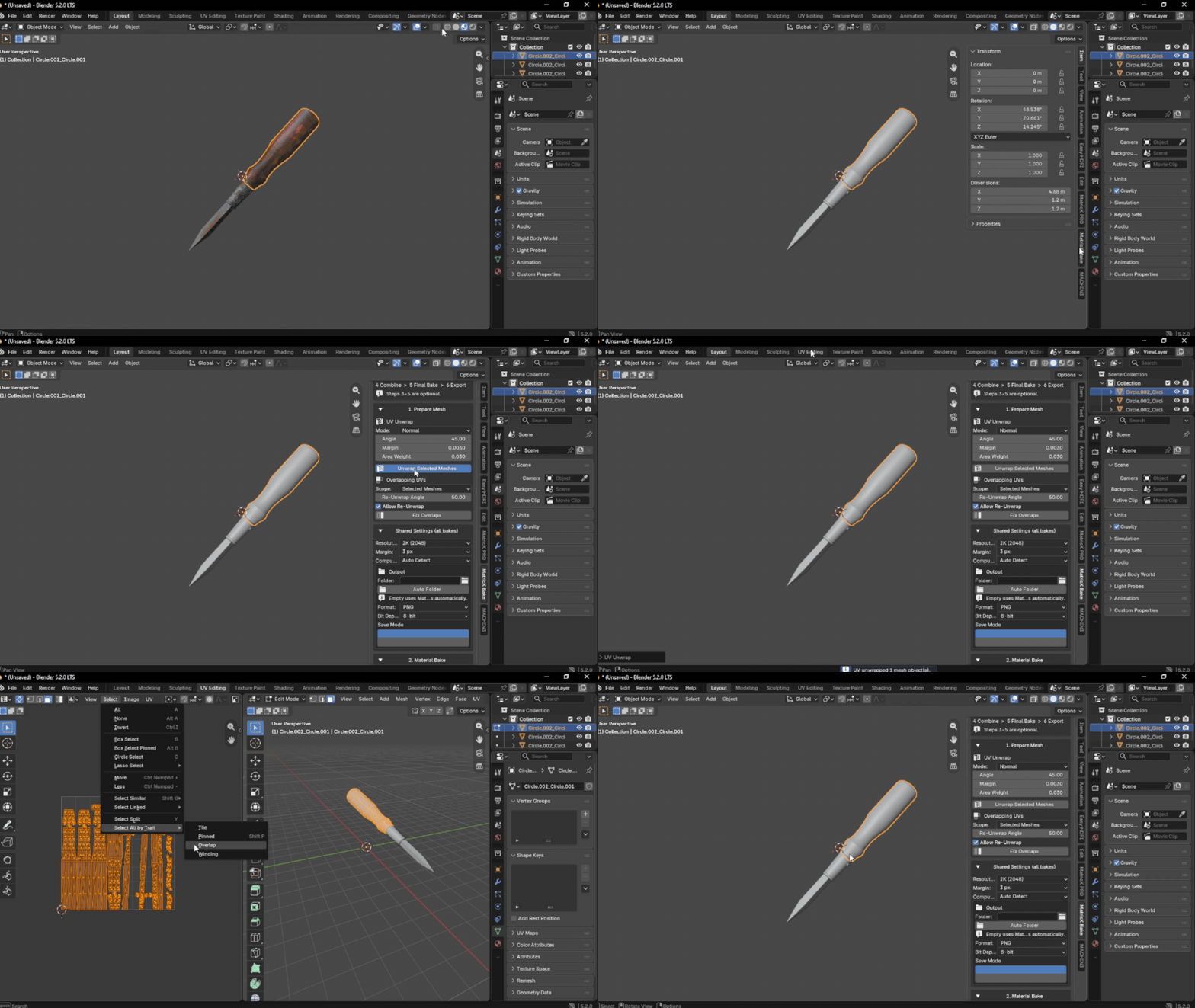
Every mesh in the bake scope shares one atlas and one set of maps — instead of a separate texture set per object.
Per Object
Each mesh gets its own texture set. Existing per-object UVs are fine as-is.
One Texture Set
All meshes in the bake scope share one atlas and one set of maps.
| Atlas UV Option | Use When |
|---|---|
| Pack Existing Islands | Each object already has good UV cuts — recommended default |
| Rebuild Shared Atlas | UVs are poor, missing, or overlap heavily |
| Use Existing UVs | An artist already created a proper shared atlas |
One Texture Set in Action
06 / Built to Work With MatricX Pro
Procedural imperfections
survive the bake.
Joining objects normally breaks procedural masks. MatricX Bake stops that from happening.
MatricX Pro's imperfection layers frequently use Object or Generated coordinates inside nested node groups. MatricX Bake stores each source object's original coordinates and substitutes them only on temporary copied materials — so dirt, wear, noise, bump and layered Mix Shader masks keep their original placement. Your source materials and node groups are never modified.
Channel-consistent flattening compensation keeps MatricX Dirt from replacing broad metal regions with brown dielectric color, and keeps Edge Wear from baking stronger than the source material — while other Mix Shader materials use standard linear conversion.
Build Surface
Bake Textures
Already own MatricX Bake? Use code BAKE2PRO for a discount on MatricX Pro.
Optional module — existing Pro customers only
You Already Solved the Surface
Now finish the pipeline
with a real bake.
MatricX Pro builds the surface. MatricX Bake turns that result into clean, packed, game-ready texture maps — without breaking the procedural imperfections you already spent time on.
Existing Pro customer discount: PRO2BAKE
07 / Map Packing
AO, roughness and metallic.
One channel each.
Combine AO, Roughness and Metallic into one Non-Color image, packed for standard game-engine workflows.
| Mode | Red | Green | Blue |
|---|---|---|---|
| ORM | AO | Roughness | Metallic |
| ARM | AO | Roughness | Metallic |
| RMA | Roughness | Metallic | AO |
Packing requires AO, Roughness and Metallic to be enabled. If a source map is missing, MatricX Bake warns and safely skips the packed output. Setup Baked Material can also split a packed map's channels back out if the individual maps aren't available.
08 / Preview
One click.
A ready preview material.
Setup Baked Material builds a working PBR preview from your baked maps — correctly wired, every time.
- ✓Base Color connects as sRGB
- ✓Utility maps connect as Non-Color
- ✓Normal maps use a Normal Map node
- ✓Height maps connect through a Bump node
- ✓Opacity maps connect to Alpha and enable transparency
- ✓For One Texture Set, the material applies across every object in scope, using the shared atlas UV
09 / Decals & Export
From baked material
to shipped asset.
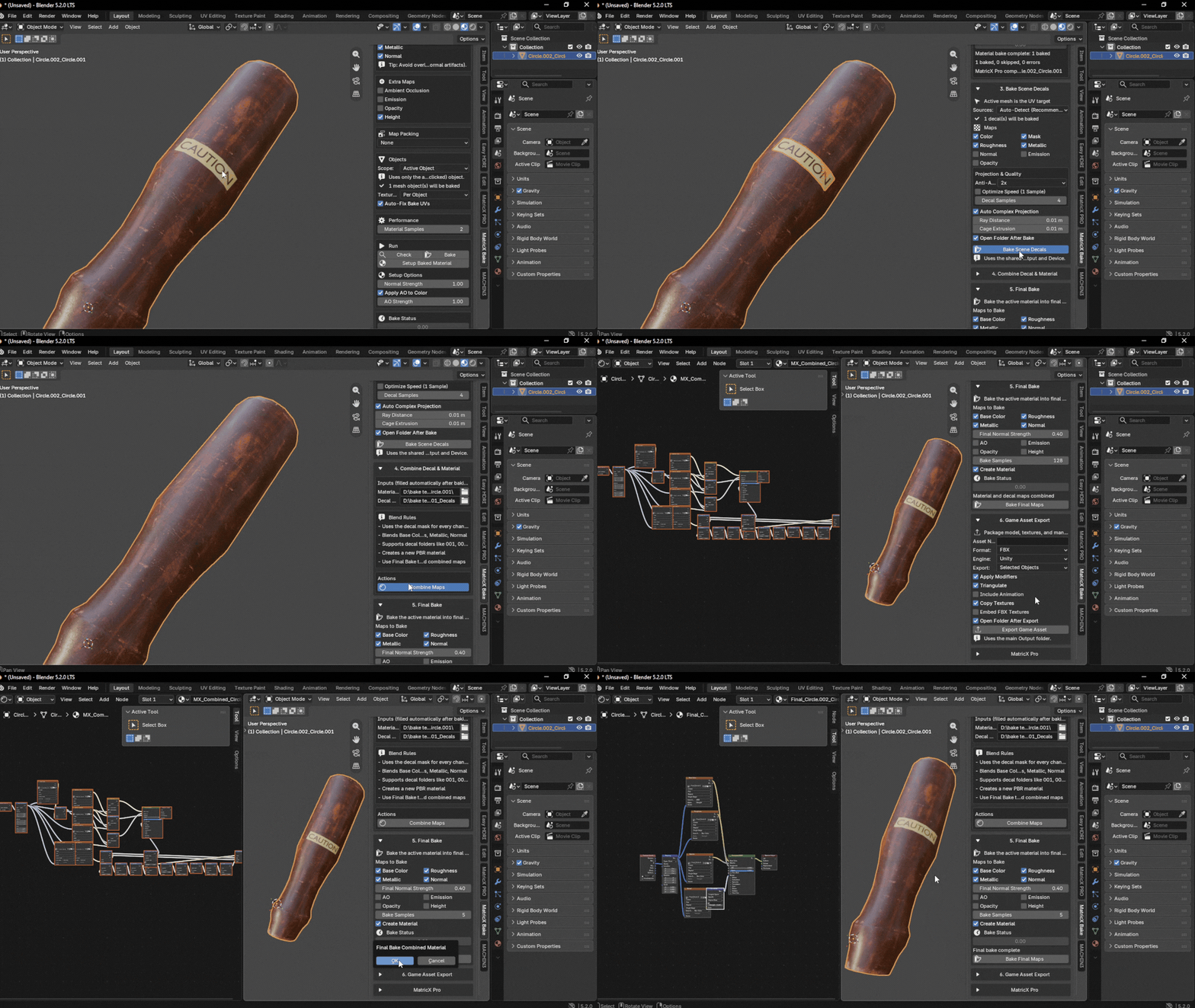
Bake Scene Decals
Bakes decal meshes into the active target's UVs. In One Texture Set mode, decal baking targets the full bake scope and writes into the same shared atlas as the material maps.
Combine Decal & Material
Blends Base Color, Roughness, Metallic and Normal using the decal mask into one new PBR material. Combine Set & Apply to All assigns it across every receiver mesh automatically.
Flatten to Export-Ready Maps
Flattens the current material into a simplified texture set after combining decals, or whenever a flattened game-ready result is needed.
Game Asset Export
Packages the model, textures and an asset_manifest.json file. Supports FBX and GLB depending on your export settings.
10 / Why MatricX Bake
Built for the step
after the material is right.
MatricX Bake exists for the moment a finished Blender material needs to leave Blender — without losing what made it look right in the first place.
11 / Built For
If you're shipping to
a game engine, this is for you.
Clean, packed PBR maps ready for Unity, Unreal, Godot, or any engine that reads standard texture channels.
Multi-object scenes baked into one shared atlas without manual UV surgery.
Procedural imperfections that survive baking and joining, exactly as authored.
A complete path from finished Blender material to FBX/GLB export with a manifest.
Specifications
The technical details.
12 / Before You Buy
The things
you should know.
Do I need MatricX Pro to use MatricX Bake?
No. MatricX Bake works with any Blender material. It includes extra compensation specifically for MatricX Pro's procedural imperfection layers, but that's a bonus, not a requirement.
Can it bake multiple objects into one texture?
Yes — One Texture Set mode shares one atlas and one set of maps across every mesh in the bake scope.
What if my UVs are messy or missing?
Auto-Fix Bake UVs detects missing UVs, zero-area faces, stacked or overlapping faces, and out-of-tile coordinates, then creates a dedicated bake UV automatically. Your original UV layer is left untouched.
Does it support glass and refractive materials?
Yes, with the understanding that baked PBR maps can't perfectly recreate live refraction or caustics. Base Color with Include Scene Lighting, plus Roughness, Normal and Opacity, gets the closest visual match.
What export formats are supported?
FBX and GLB, packaged together with your textures and an asset_manifest.json file.
Does the advanced UV mode work on macOS or Linux?
The MinistryOfFlat-powered Advanced mode is Windows-only. On macOS and Linux, Normal UV mode is used instead, and every other workflow — material, decal, final bake, packing and export — remains fully available.
Which Blender versions are supported?
Blender 4.5 and 5.0 or newer, with 5.1 and 5.2 specifically tested.
Need the details? Read full documentation.
MatricX Bake
From finished material
to shipped asset.
Clean PBR maps, one shared texture set, decals baked in, and an export package ready for your engine — without the manual cleanup.